
Create a preset
Save a coding-agent configuration from the dashboard.
Before you start
Sign in to the server dashboard. The agent's harness plugin must be installed and enabled; an administrator manages plugins. Install and authenticate the agent CLI on the execution machine before trying to launch it.
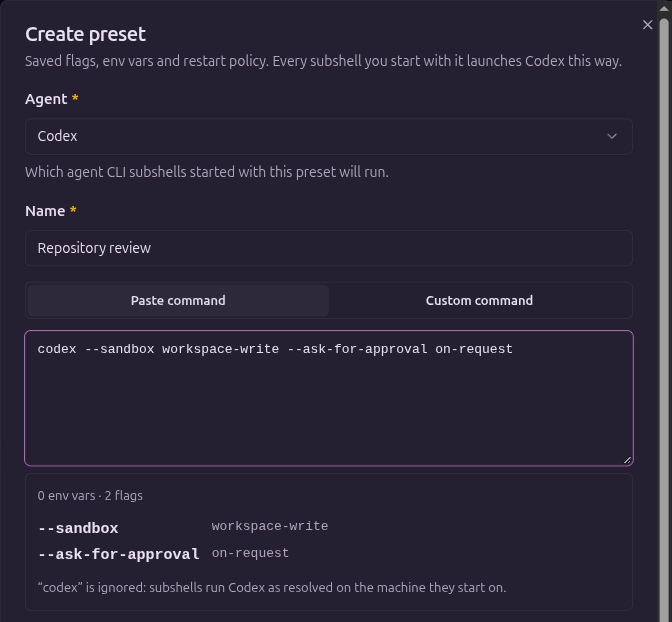
This example creates a Codex preset named Repository review. Choose flags supported by the version of the agent CLI you installed.
Save the configuration
- In the dashboard sidebar, open Presets and select New preset.
- Choose Codex in Agent.
- Enter
Repository reviewin Name. - In Paste command, enter the following command:
codex --sandbox workspace-write --ask-for-approval on-request- Review the parsed flags. This example saves
--sandboxwithworkspace-writeand--ask-for-approvalwithon-request. - Leave Auto-restart on exit off if you want to decide when an exited agent restarts.
- Select Create preset.
The preset appears under Codex in the library. Its name identifies the saved configuration; it does not name the agent's conversation.
Paste or edit individual values
Paste command parses environment assignments and flags; it does not execute the pasted command. The executable token is informational. The selected agent determines which program Subshell resolves and launches.
Switch to Custom command to edit Env vars and Flags individually. Both views edit the same values. Keep arguments containing spaces as one value and review the parsed result before saving.
Environment values here belong to the preset, not the server's service configuration. For host-level changes, see Files and paths. Preset credentials are stored with the preset; avoid putting secrets in screenshots, command examples, or shared instructions.
The agent is fixed when the preset is created. To use another agent, create another preset.
Save a launch as a new preset
You can also save a configuration while assembling a launch. In the dashboard sidebar, open Subshells → New subshell, fill in the agent, machine, directory, and prompts, then enable Save as preset at the bottom of the form. Enter a Name before launching.
This creates a new preset from the filled form. It does not edit a preset you previously selected. The initial setup wizard does not show this option.
Restart policy
Auto-restart on exit restarts an agent that exits on its own, with a growing delay when attempts keep failing. Resuming the same conversation depends on the harness's support; a restart does not guarantee conversation resumption. See Agents for the harness you use.
Next steps
Follow Set launch defaults to add a project and task, or Use and manage presets to launch with this configuration.
Edit on GitHubLast updated on