
Addresses and trusted origins
Configure the addresses on which the server listens and accepts browser requests.
Three separate settings
| Setting | Purpose |
|---|---|
HOST | Interface on which the process listens. |
APP_BASE_URL | Canonical browser address used for authentication and callbacks. |
TRUSTED_ORIGINS | Additional browser origins explicitly allowed by the operator. |
HOST=0.0.0.0 listens on IPv4 interfaces. It does not make every hostname trustworthy. An origin includes scheme, hostname, and port; a URL path is not part of it.
Edit addresses
Sign in as an administrator and open Server Settings → Networking in the server dashboard's sidebar. The Addresses card contains Port, Bind address, Public base URL, and Other addresses browsers will use. To change these values from the server host's terminal, run subshell-server configure. Use a complete URL such as https://server.example.com, and restart when changing boot-time values.
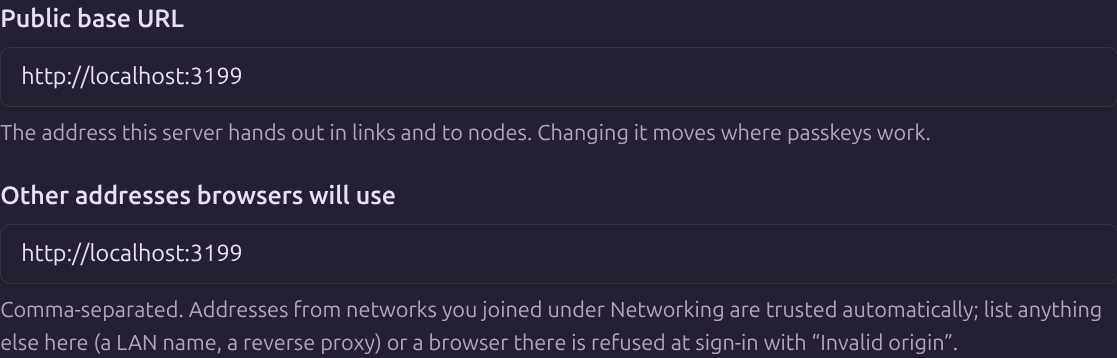
For direct environment or configuration-file edits, locate the active file with Files and paths.
The effective registry combines local origins, eligible IPv4 LAN interfaces on wildcard binds, operator extras, and enabled network plugin addresses. Network plugin records are read live.
Names and authentication
Passkeys are associated with the configured base URL's hostname. Opening a different trusted hostname does not make those credentials valid for it.
OIDC uses the provider's configured canonical entry origin. Review the provider's callback when changing server names.
Origin trust
Do not add arbitrary websites to the trusted list to suppress an error. A trusted origin participates in the instance's browser security boundary.
Next steps
Read Sign-in and origin errors, LAN access, and HTTPS and reverse proxies.
Edit on GitHubLast updated on